The world of home cinema is constantly evolving, and with it, so are expectations regarding the audio experience. Modern televisions deliver impressive picture quality, but when it comes to sound, they often reach their limits. A soundbar is the ideal solution for filling the room with rich, dynamic sound. However, to unlock a soundbar’s full potential, connecting it correctly to your television is crucial. The variety of soundbar connections can seem confusing at first glance, but with the right knowledge, the setup can be optimised without any hassle. Find out more here about the most common connection options and get help finding the perfect connection for your individual sound experience.
The built-in sound on flat-screen TVs is often inadequate, and frequently insufficient even for everyday use. A soundbar delivers powerful sound that makes dialogue clearer, music more detailed and sound effects more immersive. However, sound quality depends not only on the soundbar itself, but largely on the type of connection to the TV. Choosing the right cable and the correct interface is crucial in determining whether uncompressed audio data can be transmitted or whether the soundbar’s potential remains untapped. It is a matter of building a bridge that optimally routes the digital data stream from the TV to the soundbar.
Key Takeaways
- HDMI eARC is the best connection option for maximum audio quality and support for modern 3D audio formats
- HDMI ARC offers good convenience and stability for compressed multi-channel audio formats such as Dolby Digital
- The optical connection (TOSLINK) is a reliable digital alternative when HDMI ARC/eARC is not available
- Bluetooth enables wireless music playback from mobile devices, but has limitations in terms of latency and audio quality
- Wi-Fi offers higher bandwidth than Bluetooth and enables multi-room audio and smart features
- Analogue connections (RCA, jack) are still useful for older devices and mobile playback sources
HDMI ARC & eARC, the digital standard
The HDMI interface has established itself in recent years as the standard for digital video and audio transmission. In the context of soundbars in particular, two variants are of great importance: HDMI ARC and HDMI eARC.
HDMI ARC (Audio Return Channel)
HDMI ARC, the Audio Return Channel, revolutionised the way televisions and audio systems communicate with one another. Before HDMI ARC, a separate audio cable was often required to route sound from the television to the soundbar, whilst another HDMI cable transmitted the picture from the source device to the TV. With HDMI ARC, a single HDMI cable becomes multifunctional. It not only transmits the video signal from the source device to the TV, but can also send the audio signal back from the TV to the soundbar. This not only reduces cable clutter but also enables convenient control.
A major advantage of HDMI ARC is the integration of HDMI CEC (Consumer Electronics Control). This feature allows you to control multiple devices connected via HDMI using just one remote control. For example, you can use the TV remote control to switch not only the TV but also the connected soundbar on and off, and to adjust the volume. This makes everyday operation much simpler and makes the audio experience even more intuitive. HDMI ARC is ideal for transmitting stereo and compressed multi-channel audio formats such as Dolby Digital and DTS.
HDMI eARC (enhanced Audio Return Channel)
HDMI eARC, the enhanced Audio Return Channel, is the next generation of HDMI ARC and offers significantly higher bandwidth. This higher bandwidth is key to transmitting uncompressed and high-resolution audio formats that would not be possible with HDMI ARC. These include immersive 3D audio formats such as Dolby Atmos and DTS:X, which place the listener right at the heart of the action by positioning sounds not only horizontally but also vertically within the room.
For audiophiles and those who want to get the most out of their home cinema system, HDMI eARC is the preferred choice. It ensures that audio data reaches the soundbar from the source without loss or compression, resulting in a more detailed and dynamic sound experience. If the soundbar and TV are eARC-compatible, this connection will deliver the best audio quality. It is important to note that certain manufacturers, such as Samsung, do not support DTS Master or DTS:X audio formats via their eARC connection. This is a manufacturer-specific limitation that should be considered before purchasing a soundbar to use with a Samsung TV, in order to ensure the desired sound experience.
Optical connection (TOSLINK), the tried-and-tested alternative
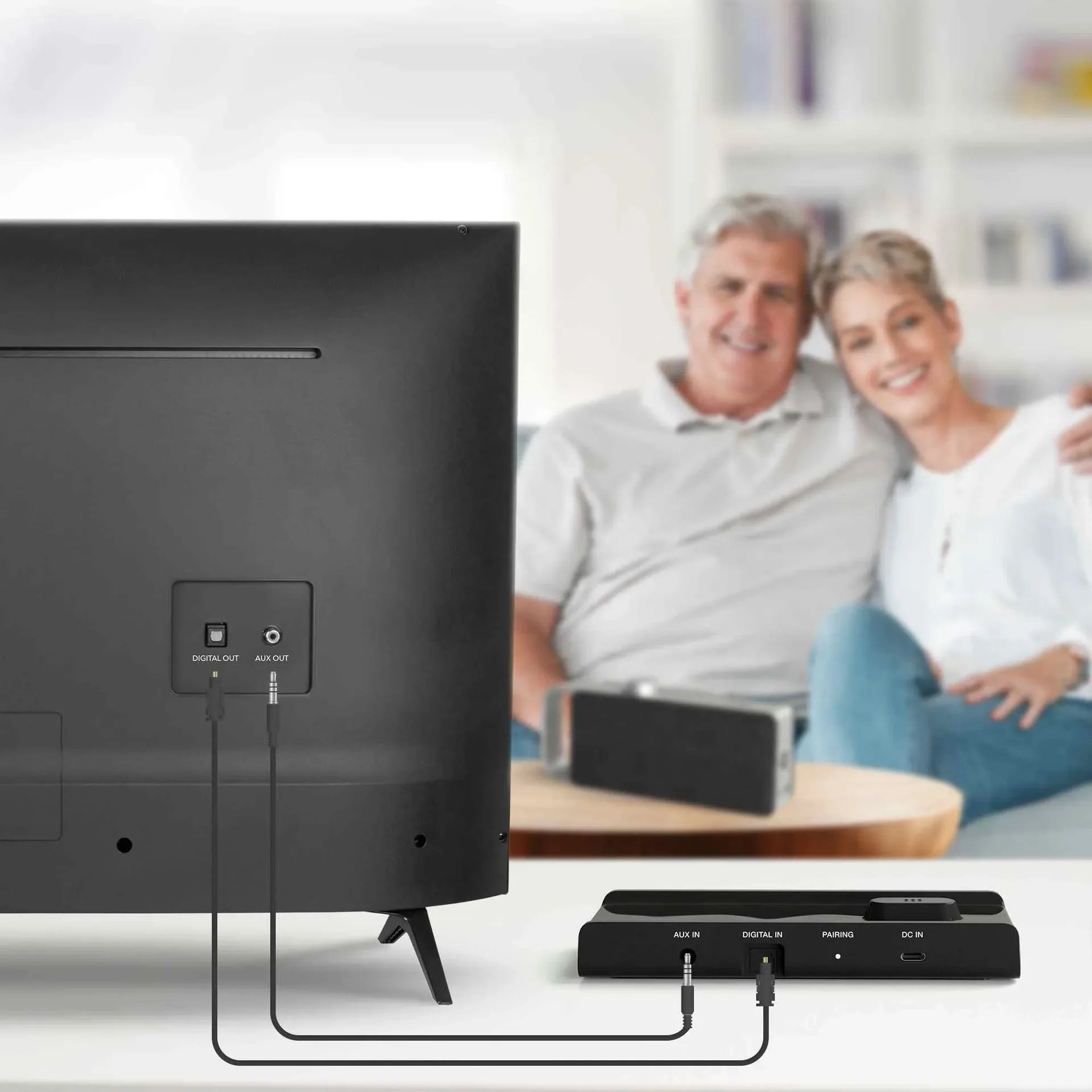
The optical connection, also known as TOSLINK, has long been an established method for digital audio transmission. It uses light pulses transmitted through a fibre-optic or plastic cable to carry audio data. This makes it immune to electromagnetic interference that can occur with copper cables.
Optical cables are a reliable choice if the TV or soundbar does not have an HDMI ARC/eARC port, or if this port is already in use. They generally support stereo audio and compressed multi-channel formats such as Dolby Digital and DTS. However, the optical connection is not suitable for transmitting uncompressed high-resolution audio formats or immersive 3D sound formats such as Dolby Atmos and DTS:X, as its bandwidth is insufficient for this purpose. Nevertheless, it delivers clear digital audio quality and is an excellent and stable connection option for many applications, consistently ensuring a satisfying sound experience.
Wireless freedom, Bluetooth & Wi-Fi connections
In addition to wired connections, modern soundbars also offer wireless options that provide flexibility and convenience. Bluetooth and Wi-Fi are the most prominent examples here.
Bluetooth: Wireless convenience
Bluetooth is a widely used wireless technology for short-range communication between devices. In soundbars, Bluetooth enables a simple and fast wireless connection to smartphones, tablets or other Bluetooth-enabled devices. This is particularly handy for playing music directly from a mobile device via the soundbar without having to lay additional cables. Pairing is usually straightforward and intuitive.
Whilst Bluetooth is very practical for everyday music playback, it has limitations in terms of audio quality and latency compared to wired connections. Bluetooth’s bandwidth is limited, which often leads to compression of the audio data. For a home cinema experience with films and games, where lip-sync and the highest audio resolution are crucial, wired solutions such as HDMI ARC/eARC are generally preferable. However, for occasional music listening or playing podcasts, Bluetooth offers a high level of convenience.
Wi-Fi: Network integration for smart features and multi-room
Wi-Fi offers significantly higher bandwidth than Bluetooth and is capable of transmitting lossless or only minimally compressed audio data. Many modern soundbars integrate into the home network via Wi-Fi. This opens up a wide range of possibilities that go beyond mere audio transmission.
Via Wi-Fi, soundbars can access streaming services, receive firmware updates over the network and become part of a multi-room audio system. In a multi-room system, several Wi-Fi-enabled speakers and soundbars in different rooms can be synchronised to play the same music everywhere or to enjoy different content in different zones. This connectivity enables a networked audio experience that integrates seamlessly into the smart home. Wi-Fi is the ideal wireless choice for transmitting high-resolution audio content and ensuring a stable connection for network streaming services.
Additional connection options for flexibility
In addition to the main connections such as HDMI and optical, soundbars often offer further interfaces that increase their versatility and enable connection to a wide variety of devices.
Ethernet (LAN)
An Ethernet connection, also known as a LAN port, is found on some soundbars that rely heavily on network functions. This wired network connection offers extremely stable and fast data transmission. If a soundbar regularly downloads software updates via the internet, accesses network shares or is intended to play high-resolution audio streams over the local network, an Ethernet connection is often the most reliable option. It eliminates potential fluctuations that can occur with wireless Wi-Fi connections and ensures uninterrupted communication.
USB port
The USB port on a soundbar generally serves two main purposes. Firstly, it often allows for the direct playback of audio files stored on a USB storage device such as a USB stick or an external hard drive. This allows users to enjoy their music collection directly via the soundbar without having to connect an additional playback device such as a computer or a Blu-ray player. Secondly, the USB port is frequently used for firmware updates. This enables manufacturers to update the soundbar’s software, add new features or resolve existing issues, which contributes to the device’s longevity and functionality.
Analogue connections, RCA & jack (3.5 mm)
Although digital connections dominate today, many soundbars still feature analogue inputs. The most common are RCA and 3.5 mm jack. RCA connectors, often in red and white for the right and left audio channels, are a classic method for transmitting stereo audio signals. They are frequently found on older audio devices such as CD players, turntables or older games consoles.
The 3.5 mm jack, also known as the AUX port, is widely used and can be found on most smartphones, tablets and laptops. It allows for a simple and straightforward connection between portable devices and the soundbar to play music or other audio content. Although analogue connections can be more susceptible to signal noise than digital ones, they offer universal compatibility and remain a practical and reliable option for many stereo applications. Some soundbars also feature a coaxial digital input, which likewise transmits audio signals via a single cable and provides a further digital alternative to the optical connection.
Compatibility and practical installation tips
Choosing the right connection is the first step towards an optimal sound experience. However, compatibility between the TV and the soundbar, as well as correct setup, also play a crucial role.
What connections your TV should offer
Before deciding on a soundbar, it’s worth checking the TV’s available soundbar connections. For the best audio quality and support for modern audio formats, the TV should ideally have an HDMI eARC connection. If this isn’t the case, an HDMI ARC connection is the next best option. If neither ARC nor eARC is available, an optical (TOSLINK) audio output offers a good digital alternative. Analogue outputs such as RCA or jack are relevant for older devices or specific use cases. A soundbar with a variety of inputs is generally more flexible and future-proof, as it can be adapted to different setups.
A step-by-step guide to initial setup
Once the soundbar has been connected to the mains, the actual connection to the TV begins. The preferred method here is the HDMI connection. An HDMI cable should be connected from the soundbar’s HDMI OUT (ARC/eARC) port to the corresponding HDMI IN (ARC/eARC) port on the TV. Make sure you use the specifically labelled ARC or eARC port, as not every HDMI input supports this function.
Once the physical connection is in place, it is important to adjust the audio settings in the TV menu. Look for the audio output settings and select the soundbar as your preferred audio device. There is often also an option for HDMI CEC, which should be enabled to allow control via the TV remote. If using an optical cable, select ‘Optical Output’ or ‘Digital Audio Out’ in the TV settings. Ensure the audio format is set to ‘PCM’ for stereo or ‘Bitstream’ for multi-channel audio, depending on which formats the soundbar supports.
Quick tips for ensuring the best sound
If the sound does not work as expected after connection, there are a few common causes of problems that you can check. First, ensure that all cables are securely in place and correctly connected. Check the audio settings on the TV and on the soundbar itself to ensure that the correct input device is selected. Sometimes restarting both devices helps to resolve communication issues. It is also advisable to keep the firmware of the soundbar and, if applicable, the TV up to date, as updates often improve compatibility and performance. Ensure the soundbar is positioned correctly to guarantee optimal sound distribution throughout the room.
Why high-quality cables can enhance the sound experience
Although it is often argued that any functioning cable will transmit data correctly for digital signals, the quality of cables does play a role, particularly for HDMI connections over longer distances or where high bandwidth is required (such as with eARC). High-quality HDMI cables with good shielding can minimise interference and ensure stable transmission, particularly when dealing with uncompressed audio data and 3D audio formats. With optical cables, quality is also crucial to guarantee precise, lossless light transmission. Investing in high-quality cables can help unlock the full potential of the soundbar’s connections and the entire audio system, enabling a seamless listening experience.